Skip to content

虛擬儲存體與位址空間概念

本模組建立系統程式設計師觀察 z/OS 執行環境的基礎,說明虛擬儲存體如何讓多個工作以隔離且可管理的方式執行,並介紹 address space 在工作、started task 與系統服務中的角色。

學習重點

  • 理解 virtual storage、real storage 與 paging 的差異,並把 31-bit / 64-bit 儲存體模型連回 z/OS 工作負載。
  • 辨識 private area、common area、CSA、SQA、LPA 等儲存體區域在系統中的用途。
  • 用 address space 的角度理解 batch job、TSO user、started task 與系統元件的執行邊界。

核心術語

  • Virtual storage
  • Real storage
  • Address space
  • Paging
  • CSA
  • SQA
  • LPA

課程內容

20內容頁
20靜態圖像頁
16互動式圖像頁

課程導入

Page 1內容頁1 張圖像165 字元

Virtual Storage and Address Space Concepts - Virtual Storage and Address Space Concepts
Virtual Storage and Address Space Concepts Virtual Storage and Address Space Concepts - Virtual Storage and Address Space Concepts screenshot
Virtual Storage and Address Space Concepts (content)
課程正文

虛擬儲存與位址空間概念 模組

繼續使用本課程教材,即表示您同意這些條款與條件。Interskill Learning Pty. Ltd. © 2024

Virtual storageAddress space
學習檢核
  • 能用自己的話說明「Virtual Storage and Address Space Concepts」在本 topic 中的用途。
  • 能辨識 Virtual storage、Address space 的基本角色。
  • 能把互動圖像中的元件改寫成前後順序清楚的流程說明。
  • 能判斷本頁內容應回到哪一個大型主機工作情境中使用。
Page 2內容頁1 張圖像504 字元

Virtual Storage and Address Space Concepts - Objectives

Virtual Storage and Address Space Concepts Virtual Storage and Address Space Concepts - Objectives screenshot
Objectives (content)
課程正文

目標:虛擬儲存與位址空間概念

在本單元中,您將了解系統程式設計師的角色,以及此人所需的 z/OS 技術知識。

您也會檢視虛擬儲存的執行方式,以及它對系統使用者的意義。

也會討論位址空間的使用及其功能。

在本單元結束後,您應該能夠:

描述虛擬儲存的特性 說明位址空間的使用方式

Virtual storageAddress space
學習檢核
  • 能用自己的話說明「Objectives」在本 topic 中的用途。
  • 能辨識 Virtual storage、Address space 的基本角色。
  • 能把互動圖像中的元件改寫成前後順序清楚的流程說明。
  • 能判斷本頁內容應回到哪一個大型主機工作情境中使用。
系統程式設計師的角色

Page 3互動內容頁1 張圖像1 個互動熱點413 字元

Virtual Storage and Address Space Concepts - Tasks

Virtual Storage and Address Space Concepts Role of the Systems Programmer: Virtual Storage and Address Space Concepts - Tasks screenshot
Tasks (html-wrapper)
互動式圖像
圖像說明

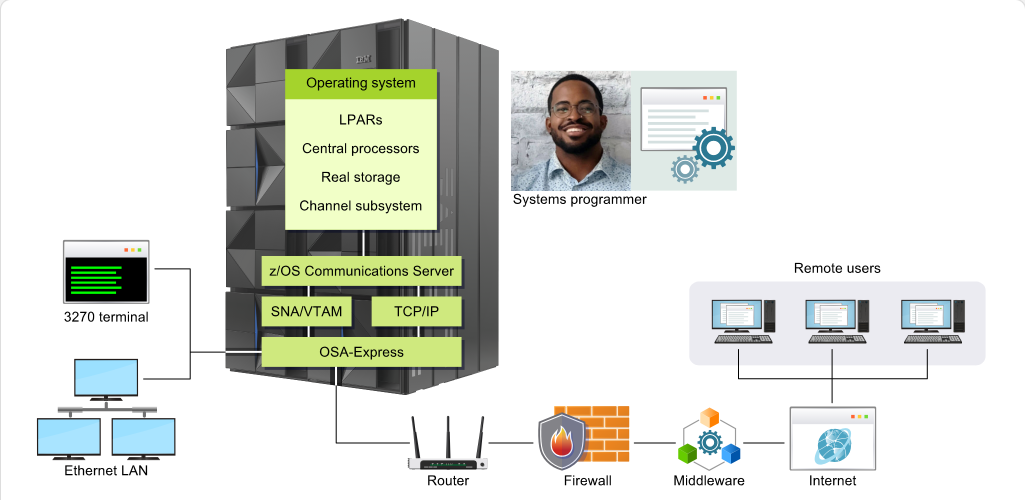
顯示與 z/OS 相關之硬體與軟體的圖解。

課程正文

現今的 z/OS 系統管理員,通常稱為系統程式設計師,需要具備配置、安裝及維護與 z/OS 及其相關子系統、產品與功能有關之硬體與軟體的技能。

此人也很可能會參與整體系統效能的監控:持續評估硬體與軟體,並執行任何所需的效能強化。

學習檢核
  • 能用自己的話說明「Tasks」在本 topic 中的用途。
  • 能把互動圖像中的元件改寫成前後順序清楚的流程說明。
  • 能判斷本頁內容應回到哪一個大型主機工作情境中使用。
Page 4互動內容頁1 張圖像9 個互動熱點301 字元

Virtual Storage and Address Space Concepts - Tasks

Virtual Storage and Address Space Concepts Role of the Systems Programmer: Virtual Storage and Address Space Concepts - Tasks screenshot
Tasks (html-wrapper)
互動式圖像
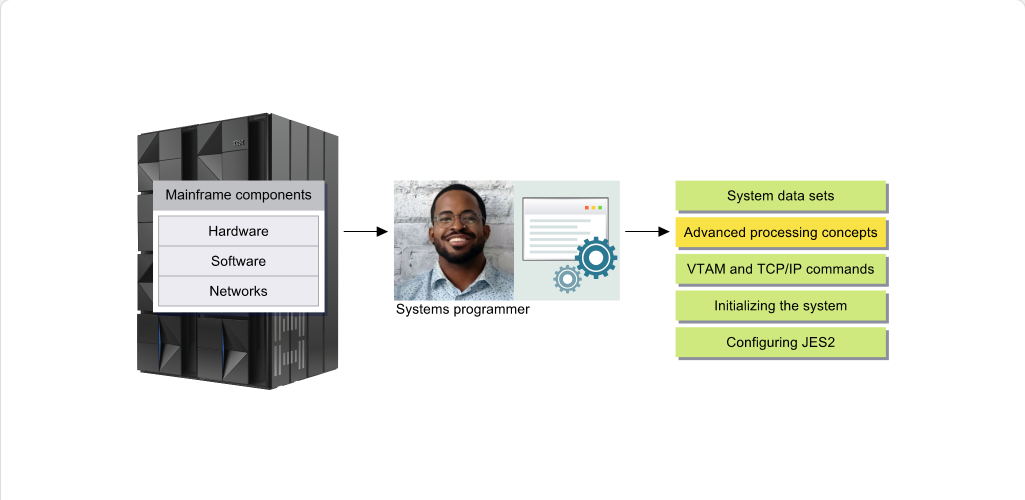
大型主機元件

大型主機元件

課程正文

這一系列模組專為在先前入門課程所涵蓋的基礎技能與知識之上進一步建立而設計,並特別針對系統程式設計師所執行的工作。

本模組將介紹虛擬儲存的概念以及位址空間的角色。

Virtual storageAddress space
學習檢核
  • 能用自己的話說明「Tasks」在本 topic 中的用途。
  • 能辨識 Virtual storage、Address space 的基本角色。
  • 能把互動圖像中的元件改寫成前後順序清楚的流程說明。
  • 能判斷本頁內容應回到哪一個大型主機工作情境中使用。
虛擬儲存體概念

Page 5互動內容頁1 張圖像1 個互動熱點841 字元

Virtual Storage and Address Space Concepts - Overview

Virtual Storage and Address Space Concepts Virtual Storage Concepts: Virtual Storage and Address Space Concepts - Overview screenshot
Overview (html-wrapper)
互動式圖像
圖像說明

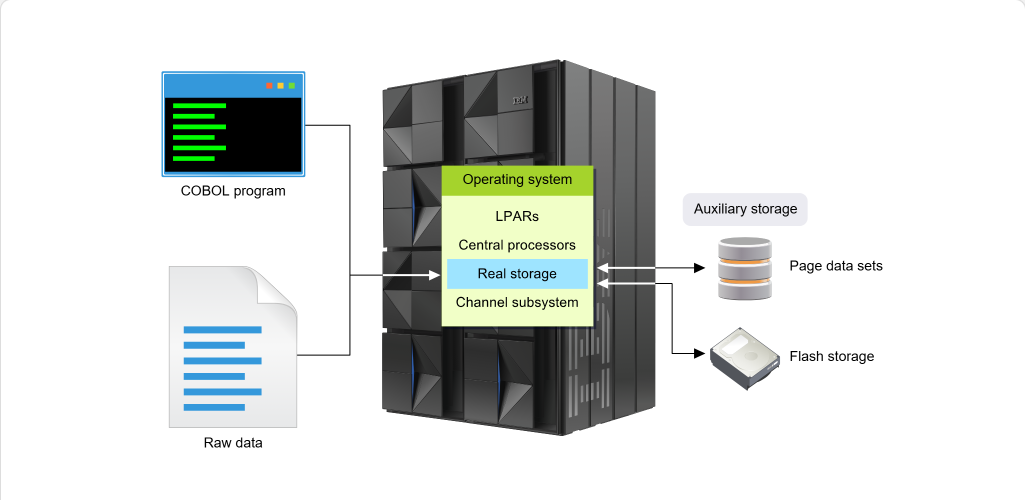
一張圖示顯示作業系統,內含 LPARs、中央處理器、實體儲存 與 通道子系統。COBOL 程式、原始資料,以及像分頁資料集和快閃儲存等輔助儲存都指向實體儲存。

課程正文

先前的單元討論了系統如何使用實體儲存體(程式與資料必須駐留於此才能被處理)以及輔助儲存體,該輔助儲存體位於大型主機之外,以直接存取儲存裝置 (DASD) 或駐留於大型主機的 SSD(快閃)儲存 (Flash Express) 形式提供。

現今技術能夠利用所謂的虛擬儲存體,讓程式產生幻覺,認為所有所需的程式指令與資料都駐留於實體儲存體。實際上,如果這不可能──例如因為儲存限制──則會使用輔助儲存體來保存部分資料。當需要時,實體儲存體中較舊的資料會被移至輔助儲存體,而需要的資料則會從輔助儲存體移入實體儲存體。

其他單元將更詳細探討虛擬儲存體與 z/OS。

Virtual storageReal storage
學習檢核
  • 能用自己的話說明「Overview」在本 topic 中的用途。
  • 能辨識 Virtual storage、Real storage 的基本角色。
  • 能把互動圖像中的元件改寫成前後順序清楚的流程說明。
  • 能判斷本頁內容應回到哪一個大型主機工作情境中使用。
Page 6互動內容頁1 張圖像10 個互動熱點394 字元

Virtual Storage and Address Space Concepts - Systems Programmer and Virtual Storage

Virtual Storage and Address Space Concepts Virtual Storage Concepts: Virtual Storage and Address Space Concepts - Systems Programmer and Virtual Storage screenshot
Systems Programmer and Virtual Storage (html-wrapper)
互動式圖像
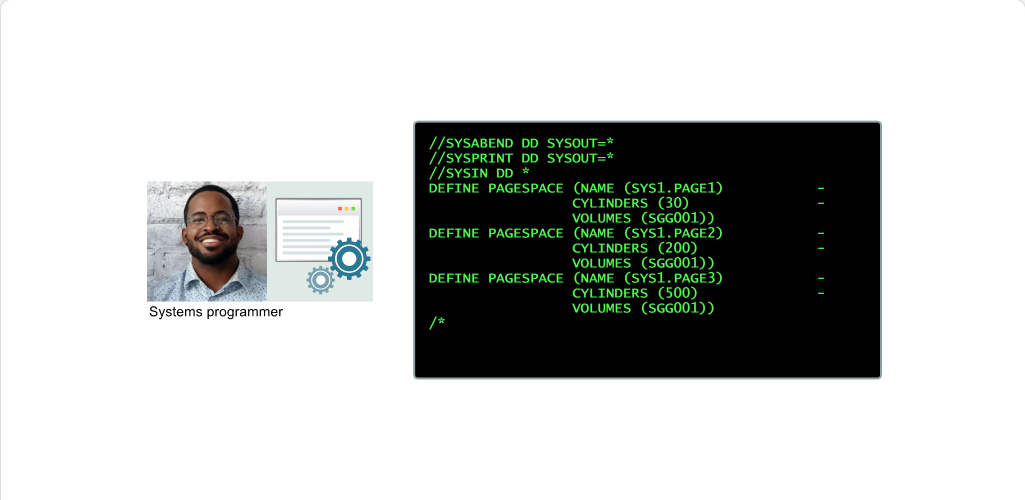
//SYSABEND DD SYSOUT=*

//SYSABEND DD SYSOUT=*

課程正文

這對系統程式設計師意味著什麼?

身為系統程式設計師,您可能要負責計算並配置適當大小的分頁資料集,以及修改其他虛擬儲存參數。這些工作很重要,因為它們會影響中央儲存能力和系統效能。

下列頁面將更詳細說明虛擬儲存的運作方式。

Virtual storagePagingData set
學習檢核
  • 能用自己的話說明「Systems Programmer and Virtual Storage」在本 topic 中的用途。
  • 能辨識 Virtual storage、Paging、Data set 的基本角色。
  • 能把互動圖像中的元件改寫成前後順序清楚的流程說明。
  • 能判斷本頁內容應回到哪一個大型主機工作情境中使用。
Page 7互動內容頁1 張圖像1 個互動熱點246 字元

Virtual Storage and Address Space Concepts - Memory Requirements

Virtual Storage and Address Space Concepts Virtual Storage Concepts: Virtual Storage and Address Space Concepts - Memory Requirements screenshot
Memory Requirements (html-wrapper)
互動式圖像
圖像說明

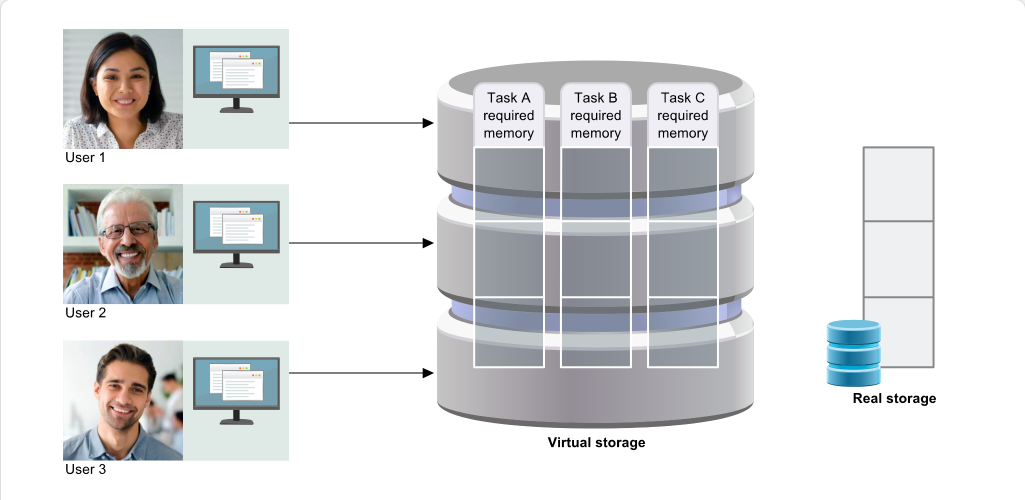
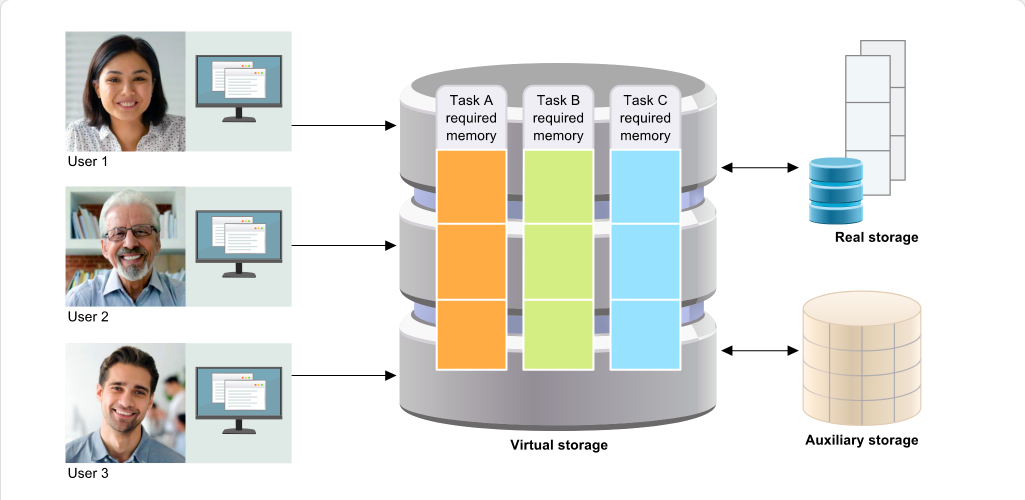
使用者 1、使用者 2 與使用者 3 分別將工作 A、B 與 C 傳送到虛擬儲存。工作 A 變為執行中,記憶體會在實體儲存中被佔用。

課程正文

程式會被設計為使用特定量的記憶體。

實際上,所有執行中的工作所需的記憶體總量可能會超過實際可用的實體儲存容量。

按一下播放以觀看此概念的示範。

Real storage
學習檢核
  • 能用自己的話說明「Memory Requirements」在本 topic 中的用途。
  • 能辨識 Real storage 的基本角色。
  • 能把互動圖像中的元件改寫成前後順序清楚的流程說明。
  • 能判斷本頁內容應回到哪一個大型主機工作情境中使用。
Page 8互動內容頁1 張圖像1 個互動熱點358 字元

Virtual Storage and Address Space Concepts - Memory Requirements

Virtual Storage and Address Space Concepts Virtual Storage Concepts: Virtual Storage and Address Space Concepts - Memory Requirements screenshot
Memory Requirements (html-wrapper)
互動式圖像
圖像說明

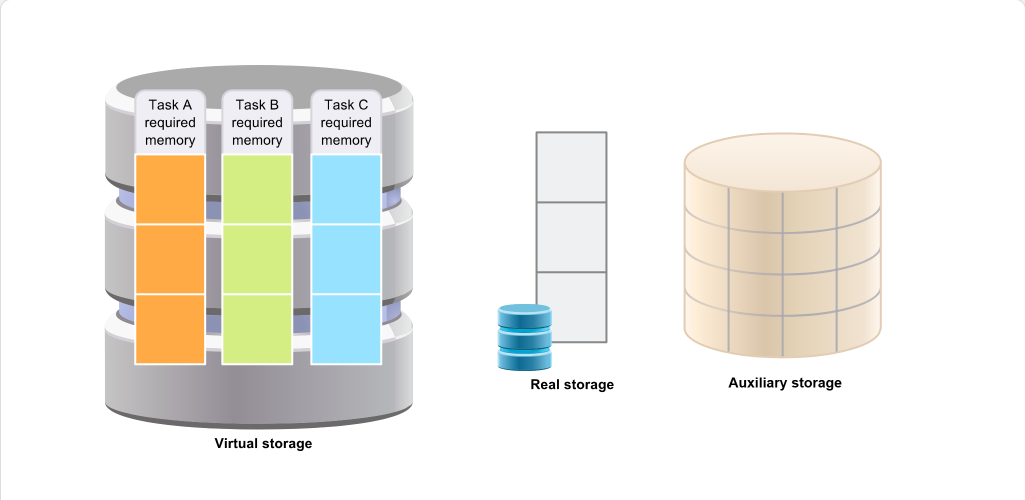
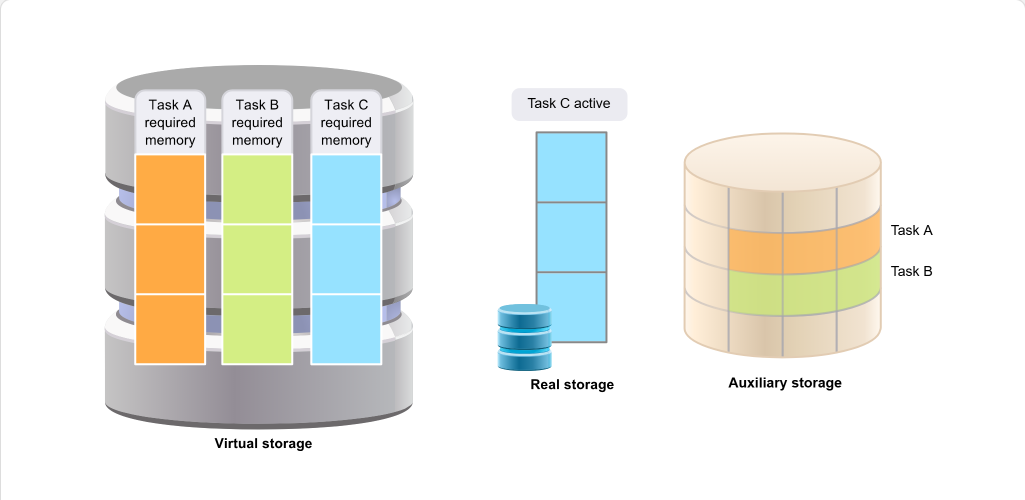
當工作變為活動時,會從虛擬儲存移入實體儲存。非活動的工作則會從實體儲存轉移到輔助儲存。

課程正文

當某項工作處於活動狀態時,其所需的記憶體會被載入實體儲存。

當某項工作不處於活動狀態時,先前由它使用的實體儲存可供其他工作使用。在這種情況下,整個位址空間會被實體換出;也就是說,其所有的頁面都會從實體儲存轉移到輔助儲存。

按一下 Play 以觀看此概念的示範。

Real storageAddress space
學習檢核
  • 能用自己的話說明「Memory Requirements」在本 topic 中的用途。
  • 能辨識 Real storage、Address space 的基本角色。
  • 能把互動圖像中的元件改寫成前後順序清楚的流程說明。
  • 能判斷本頁內容應回到哪一個大型主機工作情境中使用。
Page 9互動內容頁1 張圖像1 個互動熱點431 字元

Virtual Storage and Address Space Concepts - Memory Requirements

Virtual Storage and Address Space Concepts Virtual Storage Concepts: Virtual Storage and Address Space Concepts - Memory Requirements screenshot
Memory Requirements (html-wrapper)
互動式圖像
圖示說明

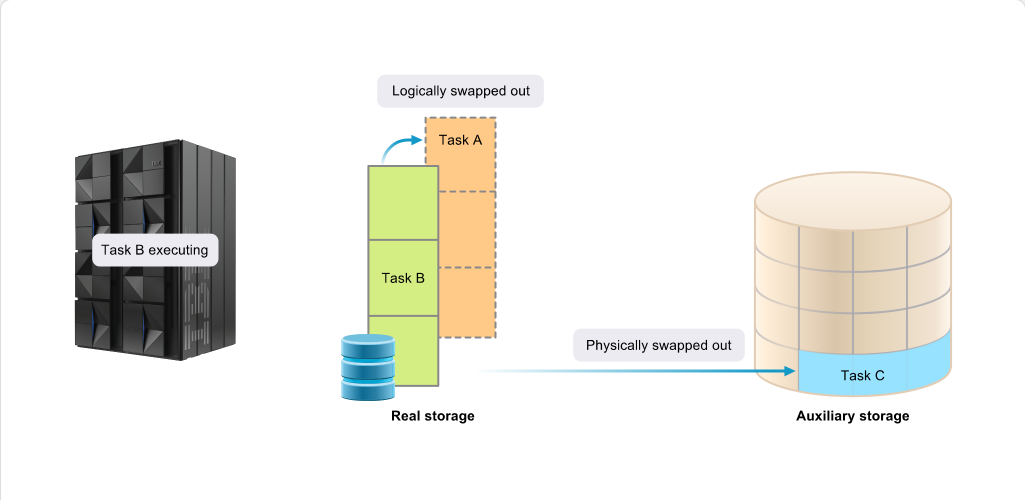
此圖顯示:當 Task B 執行時,Task A 在邏輯上已從實體儲存置換出。Task A 仍然駐留於實體儲存中。Task C 則在物理上被置換出,且位於輔助儲存中。

課程正文

由於將整個位址空間換出到並換回輔助儲存可能會產生相當大的開銷,IBM 的 System Resource Manager (SRM) 可透過邏輯交換來避免此情況。SRM 的作法是將位址空間保留在實體儲存中,但讓它看起來像已被實體換出。

若有記憶體需求,SRM 仍然可以將那些以邏輯方式交換的位址空間實際換出。

Real storageAddress space
學習檢核
  • 能用自己的話說明「Memory Requirements」在本 topic 中的用途。
  • 能辨識 Real storage、Address space 的基本角色。
  • 能把互動圖像中的元件改寫成前後順序清楚的流程說明。
  • 能判斷本頁內容應回到哪一個大型主機工作情境中使用。
Page 10互動內容頁1 張圖像1 個互動熱點153 字元

Virtual Storage and Address Space Concepts - Memory Requirements

Virtual Storage and Address Space Concepts Virtual Storage Concepts: Virtual Storage and Address Space Concepts - Memory Requirements screenshot
Memory Requirements (html-wrapper)
互動式圖像
圖像說明

顯示工作在實體儲存與輔助儲存之間移動的動畫。

課程正文

當工作完成時,其所有的實體儲存與輔助儲存會被釋放,供其他工作使用。

按一下 Play 以觀看此概念的示範。

Real storage
學習檢核
  • 能用自己的話說明「Memory Requirements」在本 topic 中的用途。
  • 能辨識 Real storage 的基本角色。
  • 能把互動圖像中的元件改寫成前後順序清楚的流程說明。
  • 能判斷本頁內容應回到哪一個大型主機工作情境中使用。
Page 11互動內容頁1 張圖像1 個互動熱點387 字元

Virtual Storage and Address Space Concepts - Pages, Frames, and Slots

Virtual Storage and Address Space Concepts Virtual Storage Concepts: Virtual Storage and Address Space Concepts - Pages, Frames, and Slots screenshot
Pages, Frames, and Slots (html-wrapper)
互動式圖像
圖像說明

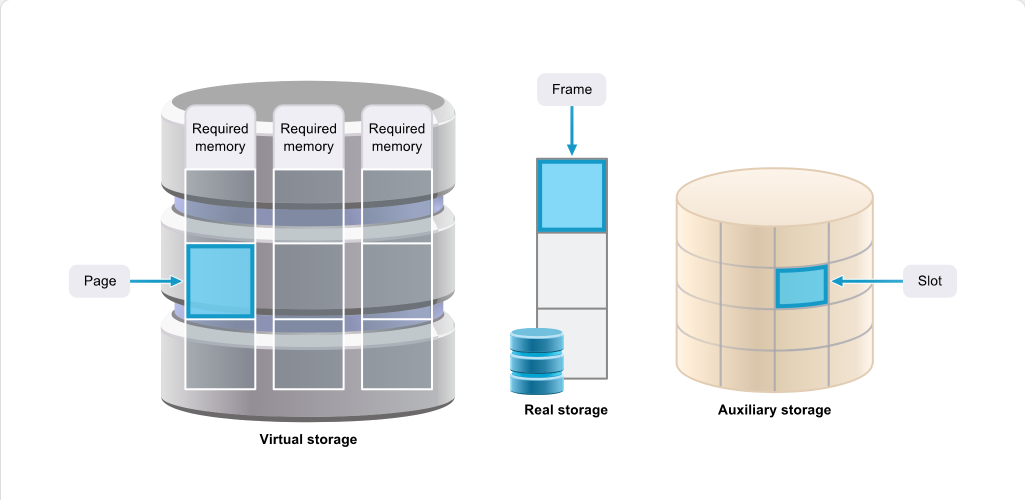
虛擬儲存分成稱為「頁」的單位。實體儲存分成稱為「框格」的單位。輔助儲存分成稱為「槽」的單位。

課程正文

程式的虛擬儲存被劃分為稱為頁的單位。每一頁大小固定,通常為 4 KB。z/OS 也支援較大的頁大小:1 MB 或 2 GB。只有某些系統,例如 Db2,可以使用這些較大的頁。

實體儲存也被劃分為 4 KB(或 1 MB 或 2 GB)的單位,稱為框格。

輔助儲存也被劃分為 4 KB(或 1 MB 或 2 GB)的單位,稱為槽。

Virtual storageReal storage
學習檢核
  • 能用自己的話說明「Pages, Frames, and Slots」在本 topic 中的用途。
  • 能辨識 Virtual storage、Real storage 的基本角色。
  • 能把互動圖像中的元件改寫成前後順序清楚的流程說明。
  • 能判斷本頁內容應回到哪一個大型主機工作情境中使用。
Page 12互動內容頁1 張圖像1 個互動熱點309 字元

Virtual Storage and Address Space Concepts - Summary

Virtual Storage and Address Space Concepts Virtual Storage Concepts: Virtual Storage and Address Space Concepts - Summary screenshot
Summary (html-wrapper)
互動式圖像
圖像說明

圖示顯示使用者在虛擬儲存上執行任務,該虛擬儲存利用結合實體儲存與輔助儲存的記憶體。

課程正文

您現在可以看到虛擬儲存的頁面如何在實體儲存框架與輔助儲存槽位之間移動,以及程式如何在不知其記憶體已被碎片化或搬移的情況下仍能執行。

當使用虛擬儲存時,相對少量的實體儲存即可支援大量工作。

Virtual storageReal storage
學習檢核
  • 能用自己的話說明「Summary」在本 topic 中的用途。
  • 能辨識 Virtual storage、Real storage 的基本角色。
  • 能把互動圖像中的元件改寫成前後順序清楚的流程說明。
  • 能判斷本頁內容應回到哪一個大型主機工作情境中使用。

單元摘要

Page 21內容頁1 張圖像504 字元

Virtual Storage and Address Space Concepts - Summary

Virtual Storage and Address Space Concepts Quiz: Virtual Storage and Address Space Concepts - Summary screenshot
Summary (content)
課程正文

摘要:虛擬儲存與位址空間概念

在本單元中,您已檢視系統程式設計師的一般角色,並討論虛擬儲存的使用,探討其主要構成要素及其元件:虛擬儲存頁、實體儲存框架與輔助儲存槽。

本單元也探討了位址空間的使用情形以及位址空間如何配置。

您現在應能做到:

描述虛擬儲存的特性 說明位址空間的使用方式

Virtual storageReal storageAddress space
學習檢核
  • 能用自己的話說明「Summary」在本 topic 中的用途。
  • 能辨識 Virtual storage、Real storage、Address space 的基本角色。
  • 能把互動圖像中的元件改寫成前後順序清楚的流程說明。
  • 能判斷本頁內容應回到哪一個大型主機工作情境中使用。

位址空間概念

Page 14互動內容頁1 張圖像1 個互動熱點432 字元

Virtual Storage and Address Space Concepts - Overview

Virtual Storage and Address Space Concepts Address Space Concepts: Virtual Storage and Address Space Concepts - Overview screenshot
Overview (html-wrapper)
互動式圖像
圖像說明

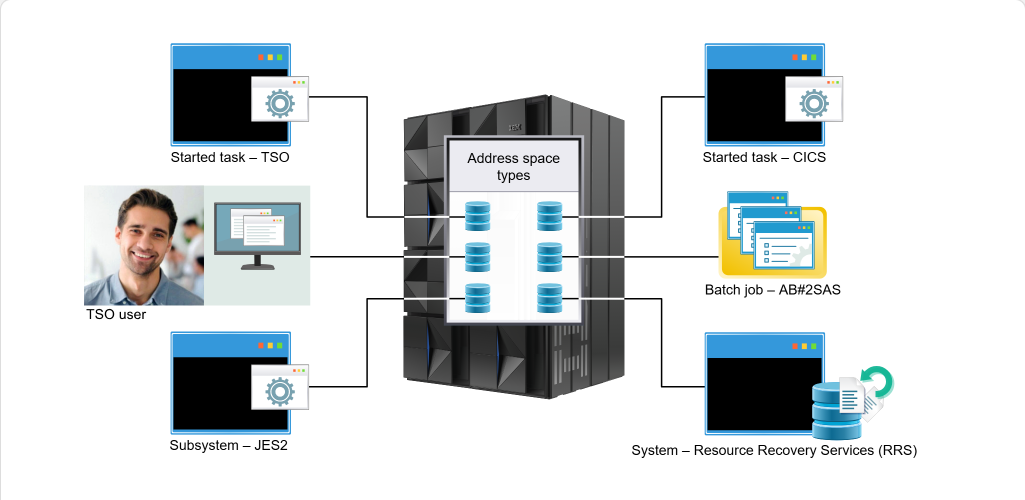
圖表顯示與位址空間相連的下列項目: - 已啟動工作 - TSO - TSO 使用者 - 子系統 - JES2 - 已啟動工作 - CICS - 批次作業 - AB#2SAS - 系統 - 資源回復服務 (RRS)

課程正文

系統為每個使用者或程式提供各自的位址空間,該位址空間可提供用於執行指令與儲存資料的虛擬位址。

這些虛擬位址允許的位址範圍大於系統的實體儲存能力。由於現今大型主機能支援大量位址空間,系統因而擁有龐大的虛擬位址容量。

Real storageAddress space
學習檢核
  • 能用自己的話說明「Overview」在本 topic 中的用途。
  • 能辨識 Real storage、Address space 的基本角色。
  • 能把互動圖像中的元件改寫成前後順序清楚的流程說明。
  • 能判斷本頁內容應回到哪一個大型主機工作情境中使用。
Page 15互動內容頁1 張圖像10 個互動熱點506 字元

Virtual Storage and Address Space Concepts - Address Space Regions

Virtual Storage and Address Space Concepts Address Space Concepts: Virtual Storage and Address Space Concepts - Address Space Regions screenshot
Address Space Regions (html-wrapper)
互動式圖像
擴充 LSQA/SWA 子池 229/230/249

擴充 LSQA/SWA 子池 229/230/249

課程正文

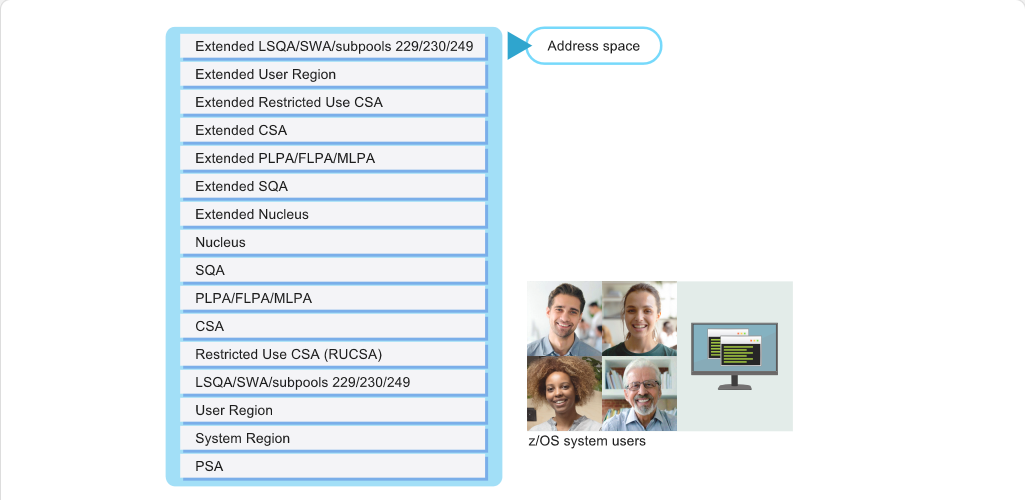
作為系統程式設計師,您不可避免地會遇到與作業、已啟動任務或使用者相關的問題,導致 abend、迴圈或其他問題。

由於 z/OS 系統中的每個使用者、作業或已啟動任務都會建立或指派一個位址空間,因此識別與該位址空間相關的各個記憶體區域非常重要,這樣您才能分析轉儲並為上述類型的問題提供解決方案。

將滑鼠移到位址空間的各個區域上以檢視簡短說明。

Address space
學習檢核
  • 能用自己的話說明「Address Space Regions」在本 topic 中的用途。
  • 能辨識 Address space 的基本角色。
  • 能把互動圖像中的元件改寫成前後順序清楚的流程說明。
  • 能判斷本頁內容應回到哪一個大型主機工作情境中使用。
Page 16互動內容頁1 張圖像10 個互動熱點283 字元

Virtual Storage and Address Space Concepts - Private and Common Storage

Virtual Storage and Address Space Concepts Address Space Concepts: Virtual Storage and Address Space Concepts - Private and Common Storage screenshot
Private and Common Storage (html-wrapper)
互動式圖像
私用 - 擴充 LSQA/SWA/子池 229/230/249

私用 - 擴充 LSQA/SWA/子池 229/230/249

課程正文

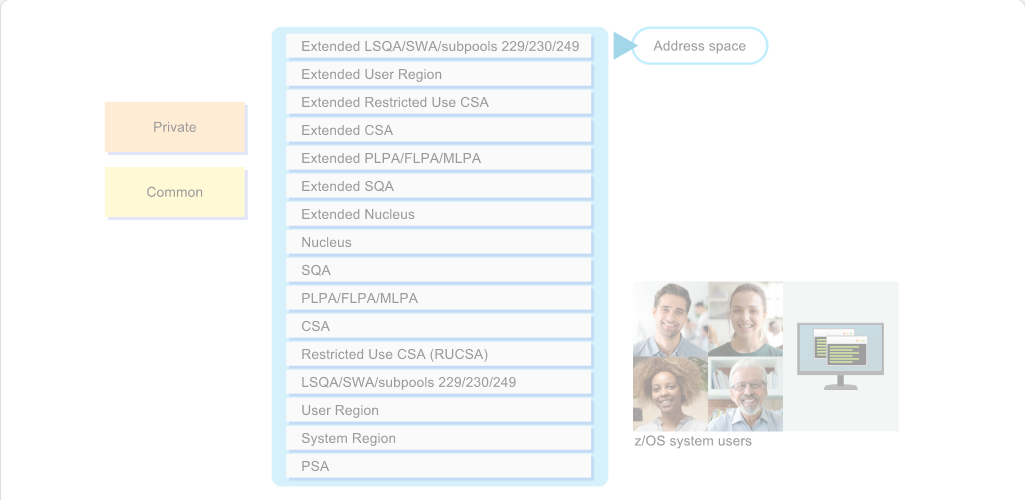
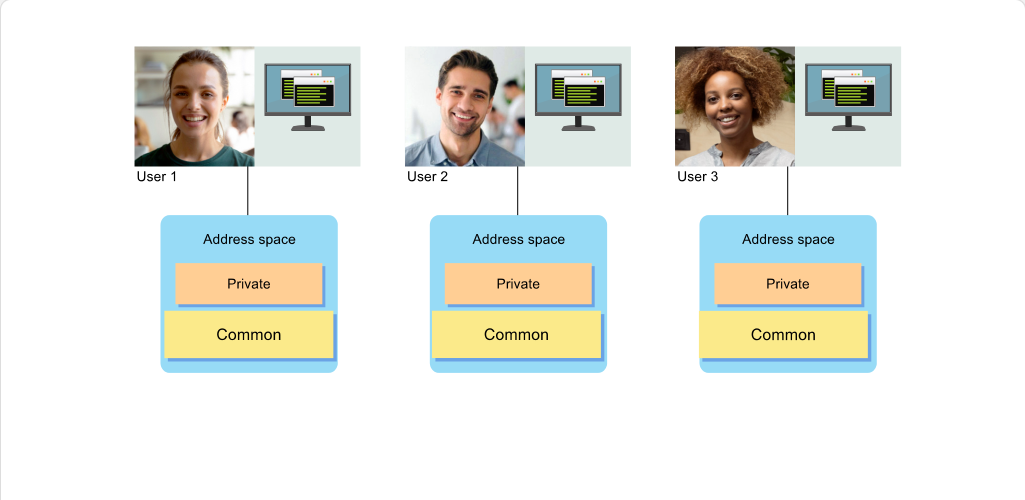
每個位址空間分為兩種儲存類型:共用與私有。

共用儲存包含許多使用者共用的模組,可避免重複並減少浪費。

私有儲存區包含每個位址空間各自獨有的資料。

Address space
學習檢核
  • 能用自己的話說明「Private and Common Storage」在本 topic 中的用途。
  • 能辨識 Address space 的基本角色。
  • 能把互動圖像中的元件改寫成前後順序清楚的流程說明。
  • 能判斷本頁內容應回到哪一個大型主機工作情境中使用。
Page 17互動內容頁1 張圖像1 個互動熱點233 字元

Virtual Storage and Address Space Concepts - Private and Common Storage

Virtual Storage and Address Space Concepts Address Space Concepts: Virtual Storage and Address Space Concepts - Private and Common Storage screenshot
Private and Common Storage (html-wrapper)
互動式圖像
圖像說明

一段顯示共用儲存與私有儲存之間關係的動畫。

課程正文

本圖說明共用儲存與私人儲存之間的關係。

共用儲存在記憶體中只保留一份,供所有使用者存取。每個位址空間有其專屬的私人儲存,只供單一使用者存取。

Address space
學習檢核
  • 能用自己的話說明「Private and Common Storage」在本 topic 中的用途。
  • 能辨識 Address space 的基本角色。
  • 能把互動圖像中的元件改寫成前後順序清楚的流程說明。
  • 能判斷本頁內容應回到哪一個大型主機工作情境中使用。
Page 18互動內容頁1 張圖像10 個互動熱點579 字元

Virtual Storage and Address Space Concepts - Common and Extended Areas

Virtual Storage and Address Space Concepts Address Space Concepts: Virtual Storage and Address Space Concepts - Common and Extended Areas screenshot
Common and Extended Areas (html-wrapper)
互動式圖像
圖像說明

下列項目列在延伸私人區域:

課程正文

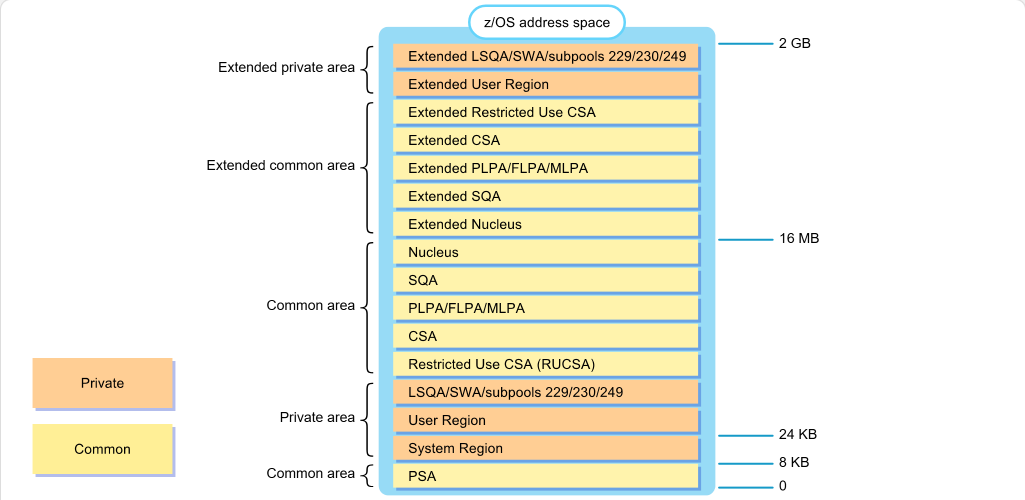
此圖表示 z/OS 位址空間的前 2 GB。如圖所示,該位址空間被劃分為多個區域。

共用區域的每個組件(PSA 除外)在位於 16 MB 線以上的延伸共用區域中都有相對應的部分。同樣地,使用者區域、LSQA/SWA 以及子池 229、230 和 249 在延伸私有區域中也有對應部分。

這種配置可確保在採用 24 位元位址的 MVS 版本中撰寫的程式,只要被載入到虛擬儲存的正確區域,就能繼續正確執行。

Virtual storageAddress spaceLOADxx
學習檢核
  • 能用自己的話說明「Common and Extended Areas」在本 topic 中的用途。
  • 能辨識 Virtual storage、Address space、LOADxx 的基本角色。
  • 能把互動圖像中的元件改寫成前後順序清楚的流程說明。
  • 能判斷本頁內容應回到哪一個大型主機工作情境中使用。
Page 19互動內容頁1 張圖像1 個互動熱點382 字元

Virtual Storage and Address Space Concepts - 64-Bit Addressing

Virtual Storage and Address Space Concepts Address Space Concepts: Virtual Storage and Address Space Concepts - 64-Bit Addressing screenshot
64-Bit Addressing (html-wrapper)
互動式圖像
圖像說明

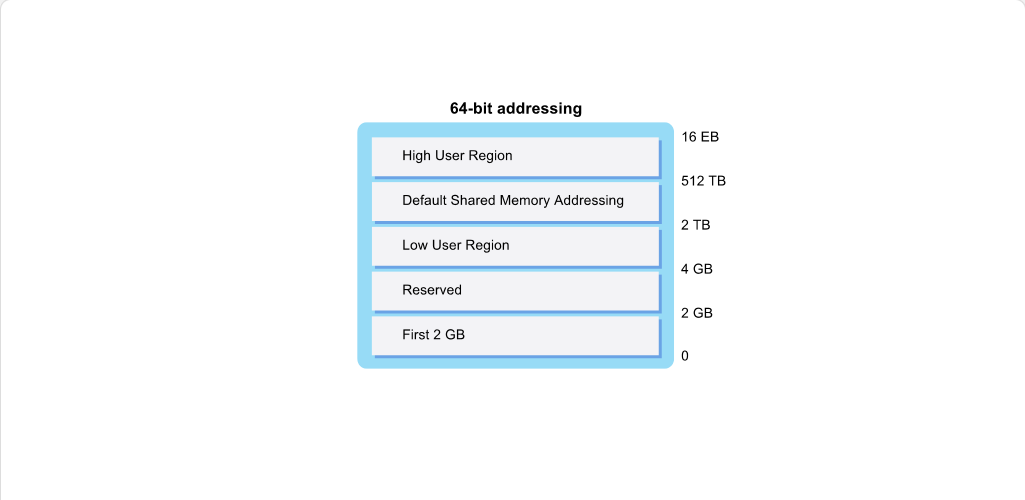
前 2 GB 顯示在介於 0 到 2 GB 的區域。保留區顯示在介於 2 GB 到 4 GB 的區域。低階使用者區域顯示在介於 4 GB 到 2 TB 的區域。預設共用記憶體定址顯示在介於 2 TB 到 512 TB 的區域。高階使用者區域顯示在介於 512 TB 到 16 EB 的區域。

課程正文

z/OS 引入了 64 位元定址,使程式可以存取最多 16 EB 的虛擬儲存。這比早期 MVS 版本所支援的多出超過 8,000,000,000 倍。

位於 2 GB 線(稱為 bar)以上的區域只能透過特殊程式設計技術存取。bar 以下的區域自從 MVS 引入 31 位元定址以來就維持不變。

Virtual storage
學習檢核
  • 能用自己的話說明「64-Bit Addressing」在本 topic 中的用途。
  • 能辨識 Virtual storage 的基本角色。
  • 能把互動圖像中的元件改寫成前後順序清楚的流程說明。
  • 能判斷本頁內容應回到哪一個大型主機工作情境中使用。

模組完成

Page 24內容頁1 張圖像540 字元

Virtual Storage and Address Space Concepts - Module Complete

Virtual Storage and Address Space Concepts Module Test: Virtual Storage and Address Space Concepts - Module Complete screenshot
Module Complete (content)
課程正文

模組完成:虛擬儲存與位址空間觀念

您可以按一下 'Exit' 離開《虛擬儲存與位址空間觀念》並記錄您的成績,或使用 'Table of Contents' 返回並檢閱該模組。

若要再次參加《虛擬儲存與位址空間觀念》模組測驗,您需要先離開模組,然後在您的 LMS 中重新參加測驗。

注意:為確保您的成績正確儲存,請使用位於本訓練視窗右上角的 'Exit' 按鈕。請勿使用瀏覽器右上角的 'X'。

Virtual storageAddress space
學習檢核
  • 能用自己的話說明「Module Complete」在本 topic 中的用途。
  • 能辨識 Virtual storage、Address space 的基本角色。
  • 能把互動圖像中的元件改寫成前後順序清楚的流程說明。
  • 能判斷本頁內容應回到哪一個大型主機工作情境中使用。

練習與評量

本模組的練習測驗與 Module Test 題目已納入「練習與評量」,可依題型或來源篩選練習。本站以非計分模式提供 10 題練習;正式分數、attempt、completion 與憑證仍以 YourLearnings / InterSkill 為準。

  • 練習測驗:5 題
  • Module Test:5 題

前往練習與評量

IBM Z 課程台灣繁體中文化教材,供 IBM Taiwan enablement 使用。